
• Skip to main content

Oh Happy Joy!

menu icon
go to homepage
  • KIDS
  • HOME
  • MOM & BABY
  • FOOD
  • search icon
    Homepage link
    • KIDS
    • HOME
    • MOM & BABY
    • FOOD
  • ×
    Home » Blogging

    Published: Sep 11, 2019 · Modified: Sep 25, 2023 by OhHappyJoy · This post may contain affiliate links. Please read our disclosure for more info.

    How To Find Popular Keywords On Pinterest

    How To Find Popular Keywords On Pinterest - You probably have heard that Pinterest is more of a search engine platform. Similar to Google, Pinterest uses keywords to make your pin searchable by users. Whenever someone is looking for something in Pinterest, the information on search terms is being stored and used for users to find relevant information they are looking for. And when you are writing a blog post or a piece of content for your business, you might want to think about what information people are searching for. A lot of people make the mistake of writing a topic that they are interested. And this is the biggest mistake you can make! This is NOT how you get traffic to your blog or website. You want to write about something that people are actually searching for. And this is where the keyword research comes in. So before you create a content and a relevant Pin, perform keyword research in Pinterest to find out what people are looking for in Pinterest. If Pinterest is one of the main sources of Traffic for you, then this is definitely what you want to do before you even create a content. So let's dig into how you find popular keywords in Pinterest.

    A) HAVE A BUSINESS ACCOUNT

    You would want to create a business account for Pinterest. Not only setting up a business account will enable you to perform analytics on your Pinterest account, it will provide you the ability to use Pinterest advertising. Pinterest advertising has a section that will help you determine popular keywords in Pinterest which I will discuss later in the post.

    B) USE SEARCH BAR

    There are two ways to utilize the search bar. Similar to google, when you search for a keyword in the search window, it will give you a list of frequently searched keywords. For example, let's say you are trying to create a content related to gardening. When you type in 'Gardening' in the search window, Pinterest would show a list of other words that are frequently searched together.
    As you can see, it will show a list of other frequently searched terms together with 'gardening'. Similarly, once you type in gardening and click the search button, it would show right under the search window a list of other words that are frequently searched together. 'Gardening for beginners', 'Gardening Ideas', 'Gardening Design' and so on.
    This is a great way to find out keywords you want to target and what similar pins are showing at the top of the search results. RELEVANT POSTS:
    • How To Create Killer Graphics Using Canva
    • How To Create Killer Pinterest Graphics That Go Viral

    C) USE PINTEREST AD

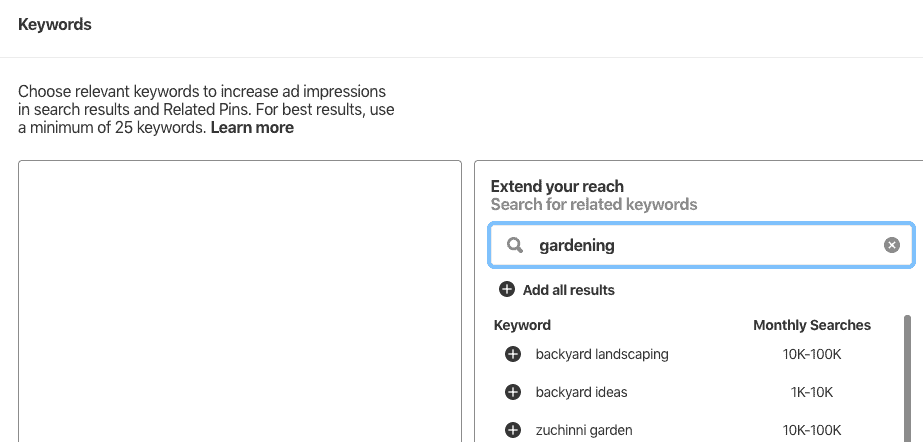
    If you are a business user (And you should as I explained in Step A above), you have access to create an Ad in Pinterest. When you create an ad, there is a section to add 'keywords' as below. When you type in 'Gardening' as the keyword, Pinterest also shows you a list of frequently searched term that's related to 'Gardening'.
    Pinterest SEO
    It shows you the search volume on each of the keyword! You can easily scroll through to find out what keywords are popular by looking at this tool alone! I hope this helped you! Remember to perform keyword research prior to writing a content to see if people are looking for the information you want to produce.

    « How To Create Killer Graphics Using Canva
    How To Create Killer Pinterest Graphic »

    Footer

    ↑ back to top

    About

    • Privacy and Disclosure Policy

    Newsletter

    • Sign Up! for emails and updates

    Contact

    • Contact

    As an Amazon Associate I earn from qualifying purchases.

    DMCA.com Protection Status