
Are you thinking about starting a blog? You see so many people issuing income reports and hear stories about bloggers making 5 figures every month and you wonder if this is also something you can do.
But you are sitting and wondering how much work it will be and how long it will actually take to start making money. You feel like you need to build a following. And you need lots of content to really get the ball rolling.
Well, the truth is, it is totally possible, as I share how I make money with Pinterest and Affiliate Marketing!
And if you are just 'thinking' and not 'doing', nothing will happen! You won't find out whether it will work or not, unless you really try!
And there are ways to start making money right away with blogging. You heard the stories of how long it really took bloggers to start generating serious income. But it all depends on the strategy.
Yes, it won't happen overnight. But once you have a strategy in mind and start executing a little bit at a time, it's completely possible to start generating income in month 3 or 4 of your blogging journey.
In order to start making money with your blog, I highly encourage you to start looking at what successful bloggers are doing. Read various ways to monetize your blog first before you dive head in first.
How To Set Up Your Blog In Quick And Easy Way
1. Choose The Right Platform To Blog
While there are a lot of platforms out there, by far WordPress is the king of blogging platform where 50% of all blogs use.
It is SEO friendly, and also easy to customize with various plug-ins. Ohhappyjoy.com uses WordPress.com and I would recommend using this platform if you are thinking of starting out.
WordPress has two different platforms - wordpress.org and wordpress.com.
Using wordpress.org would let you have your blog up for free but it has downsides. Your domain would look something like xxx.wordpress.org. If you don't mind your website looking like that then it may not be an issue.
But if you want to grow your blog professionally, it might be a good idea to have domain names ending xxx.com or xxx.blog etc. And when you use wordpress.org, you are limited to using the free themes that they have using wordpress.org.
If you want to make your blog look and feel in certain ways, you may have to upgrade to wordpress.com anyways.
So if you intend to grow your blog and start generating income, I suggest you start with wordpress.com.
2. Buy A Domain
So now that you've decided on the platform, what to do now?
Decide on the domain that you want to use for your blog. You can purchase a domain anywhere like godaddy.com, domain.com, or Bluehost.com, for as little as $0.99.
For me, I had gone through many iterations of my website domain name, before I landed on ohhappyjoy.com. I wanted my website to be a true representation of me. I wanted my name to reflect the life that I pursue, which is happy and joyful life and that's how I landed on ohhappyjoy.com.
So you might want to think about how you want your website name to be and search how much the domain would cost you. The more popular the name it is, the more expensive it gets, and unique names are normally cheaper.
3. Find A Hosting Service
If you decided on using wordpress.com as your blogging platform, from my experience, using Bluehost as your hosting service has few great benefits as a beginner. Bluehost is great when you are starting out as it's fairly cost effective, customer service is great, and it's easy to use. Once you reach about 50K sessions, I suggest switching to a hosting service, such as Bigscoots, to help your website become faster and handle larger volume of visits.
For wordpress.com users, it is really easy to get your theme set up and ready to go using Bluehost.com. And when you use Bluehost as your hosting service, you can get a free domain with your hosting service! Bluehost lets you host multiple domains and websites on your account with their premium plan which only costs $5.45 per month.
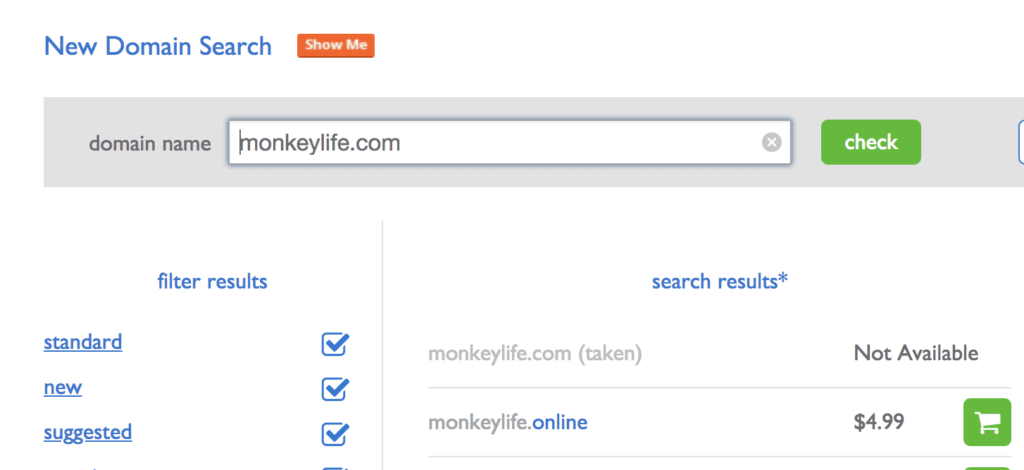
Since I use Bluehost.com for my other eCommerce store, I simply purchased a domain in Bluehost.com by going to domains and putting in a possible domain name in the domain search. As an example, I typed in www.monkeylife.com.
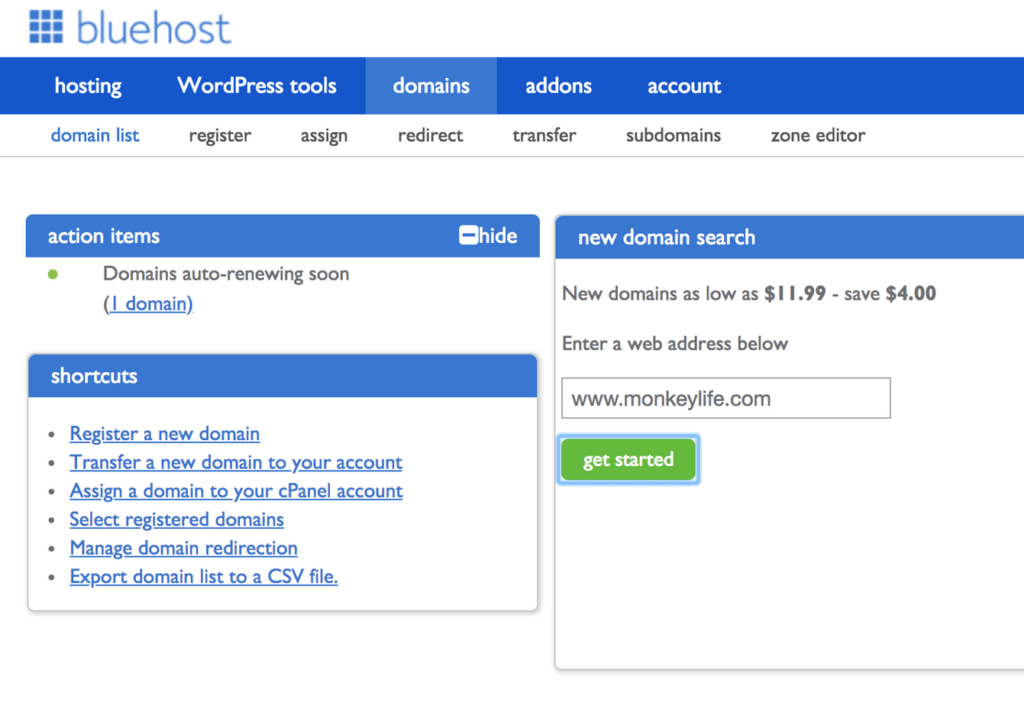
The results show that the domain I entered is taken but there are other ones available. Once you select the shopping cart button, you are directed to purchasing that domain.
4. Install WordPress
When you are using Bluehost as the hosting service and get the domain through there, you can manage all the domains and hosting on Bluehost's website. Installation of WordPress is pretty simple and easy.
Once you purchase the domain name, you can go to their 'Wordpress Tools' section. And when you click on 'New Install' you can select the domain you want to install.
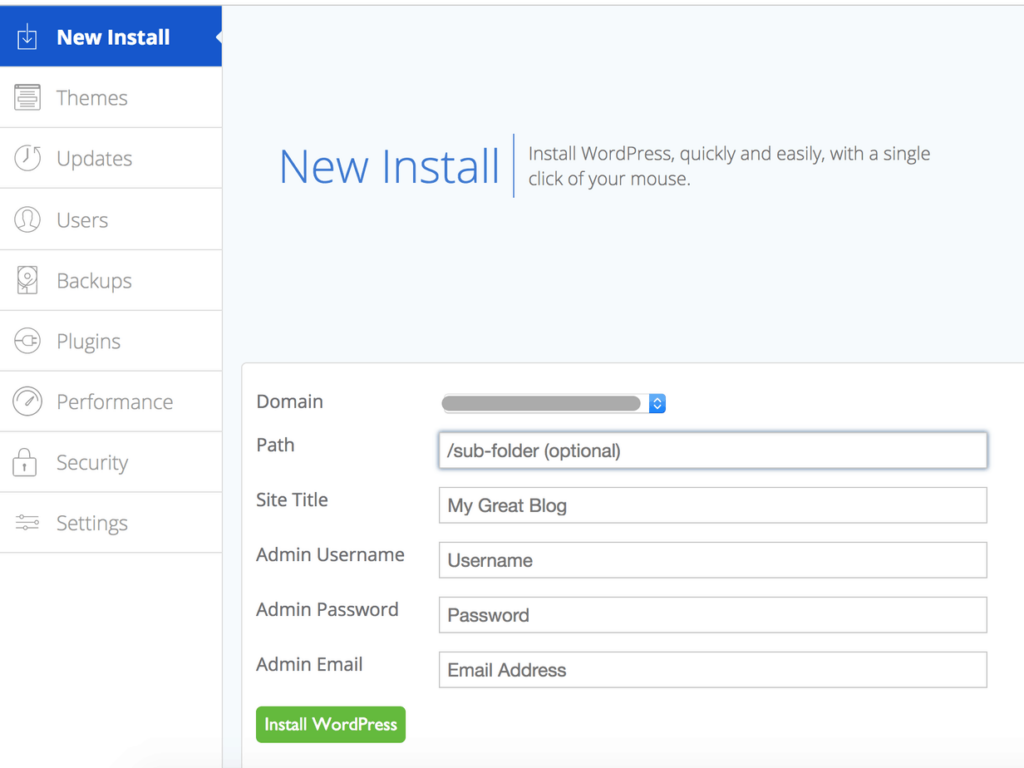
It's simple as that! Now that you've installed wordpress on your domain, you can now log into your wordpress admin dashboard.
The login page of the wordpress admin dashboard is always yourdomainname.com/wp-admin. You just need to add '/wp-admin' at the end of your domain name and you will be directed to the login page.
When your site reached 50K sessions, and you need to switch to a different hosting site like Bigscoots, they actually handle all of the backend stuff for you so you don't have to do much with anything. They have customer support that walks you through all the steps you need.
5. Purchase a WordPress Theme
You can either use a free theme, purchase a premium theme in WordPress, or purchase it somewhere else and upload the theme.
The theme I am currently using is Feast Plugin Cook'd Pro theme. It's built to optimize speed and SEO. So far, I've been really enjoying using this theme as my site has greatly improved my site speed. Although it is positioned as 'food blog' optimized theme, it's been working great for me! It is definitely on a more 'pricier' side.
Other great theme options are Kadence or Generate Press which are also optimized for speed.
After you decide on the theme, you can upload a theme. You can go to WordPress dashboard. From there, go to appearance and click on 'upload theme' which will take you to uploading the file you downloaded after purchase.
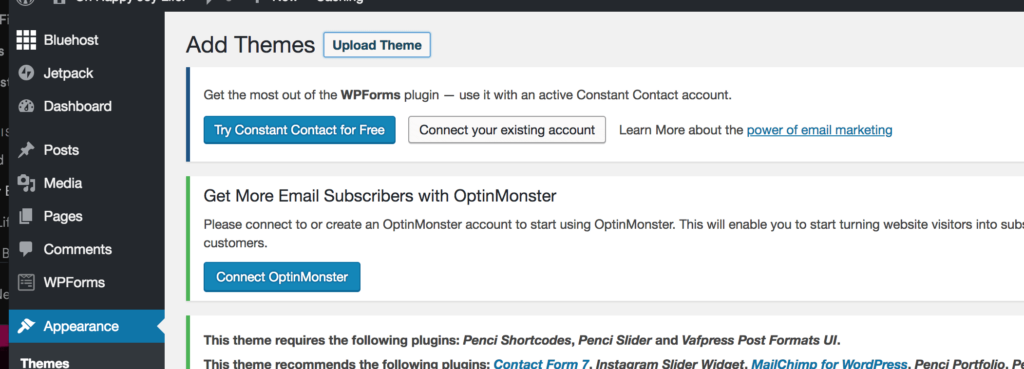
Once it's completed, you can now customize your blog under 'Appearance>Customize' within WordPress dashboard.
If you get stuck, you can always call Bluehost which has 24/7 customer support. My experience with them has been great - always responsive and got my issues resolved immediately.
6. Choose The Blog Topic - Find Content People Are Searching For
Now that you have the WordPress website set up, you can now start creating content!
In order to monetize on your content, you would want to first do some research on what topics people are searching for. There is really no point in creating a content that only interests you and not other people, if you want readers to come to your website and start reading!
There are few ways to do this:
- See what topics are popular on websites that you follow - I normally go to Buzzsumo.com and type in a website that I follow to see what topics are trending or popular on their website. It gives me a great insight into how they are writing the content and how much traction it is getting from social media. Buzzsumo is free to use up to certain number of websites per month so you can do your research there for free.
- See what pins are performing well on Pinterest - If you plan on using Pinterest to drive traffic (you should if you are not thinking about it!), type in a keyword in the window to see the types of pins come up. You can also see what related keywords pop up to get some ideas (More on Pinterest Traffic here).
7. Have Monetization Methods In Place
There are so many ways to make money from your blog. Many start with putting ads on the blog and having affiliate links. Once you have good enough traffic and following, you can also sell digital products or writing sponsored posts.
1. Sign Up To Affiliates
In order to make money right away, the best way is to start having affiliate links in the post. Without much traffic, as long as you can write great content and can drive traffic to the post, people can click on the affiliate links which in turn will make you money.
And if you are not so sure what 'Affiliate Marketing' really is, you can download my FREE affiliate marketing guide here.
Also, I find that for beginners, Amazon Associates is the best way to make money on your blog. I made $500 just from Amazon Associates the second month I started to seriously blog. This is because even if the reader doesn't buy the product that you recommended on your blog post, Amazon gives you commission on any other product the reader ended up buying on Amazon.
Amazon simply gives you commission on anything the reader purchased within 24 hours of clicking the link. Now with so many people purchasing on things on Amazon, getting commission from Amazon is relatively easy.

You can also join affiliate networks which will be your gateway to becoming an affiliate with various companies and brands. The following are few that I have joined for Oh Happy Joy
2. Put ADs on your blog
When you are just starting out, the option you can start with is Google ads. For beginner bloggers, there is also Media.net which can provide you slightly higher ad income than Googld adwords. And then once your blog traffic hits 50K page views a month, you can apply to other ad networks such as Mediavine. The next tier would be Ad Thrive which requires minimum 100K page views a month for you to apply.
8. Resources I recommend To Start Blogging
Here are few resources I recommend in building a blog:
| Product Image | Product Name / Description | Primary Button |
|---|---|---|
|
|
|
|
|
|
|
|
|
|
|
|
|
|
|
|
|
|
|
|
|
|
|

Purchase website and host your website! Friendly and cost effective for beginner bloggers

Great hosting platform for higher volume blogs that wants fast speed

Wordpress plugin that helps reduce image size for fast website load

Wordpress Theme that I use that allows for optimized SEO and fast speed

Great Wordpress plugin I use to organize and customize all my affiliate links to maximize my affiliate income